Yem Links Pro
Geo and device targeting, split tests, click analytics, auto-linking and more, added to the free Yem Links plugin. Free with a YemLogic account.
Already a member? Download Pro from your dashboard.
One short link
yoursite.com/go/standing-desk
Sends each visitor to the right store
- Visitors in the UK
store.co.uk/desk - Visitors in Germany
store.de/desk - Phones
m.store.com/desk - Everyone else
store.com/desk
Split test running between two landing pages
From sign-up to Pro in about two minutes
Pro is an add-on, so keep the free Yem Links plugin installed and active.
- Create a free account. Your name, your email and a password. No card.
- Confirm your email. Open the link we send you to unlock downloads and your license key.
- Download Yem Links Pro. It’s in your member dashboard, next to your license key.
- Install it and paste your key. Upload the zip under Plugins, then enter the key in Yem Links → Settings.
What Pro adds
Everything in the free plugin keeps working as it is. Pro adds these on top, and the Pro features guide shows how to set each one up.
Send each visitor to the right place
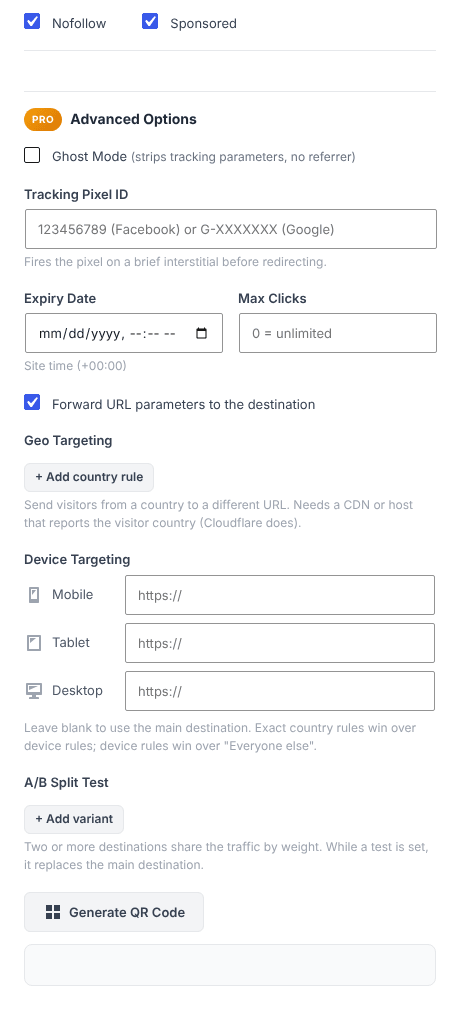
- Geo targeting by visitor country, on Cloudflare or a host that passes the visitor’s country
- Device targeting for phones, tablets and desktops
- A/B split tests with weighted variants
- Link expiry by date or number of clicks, with a fallback URL
- More redirect types: cloaked, JavaScript, meta refresh, pixel and Ghost Mode
See what’s working
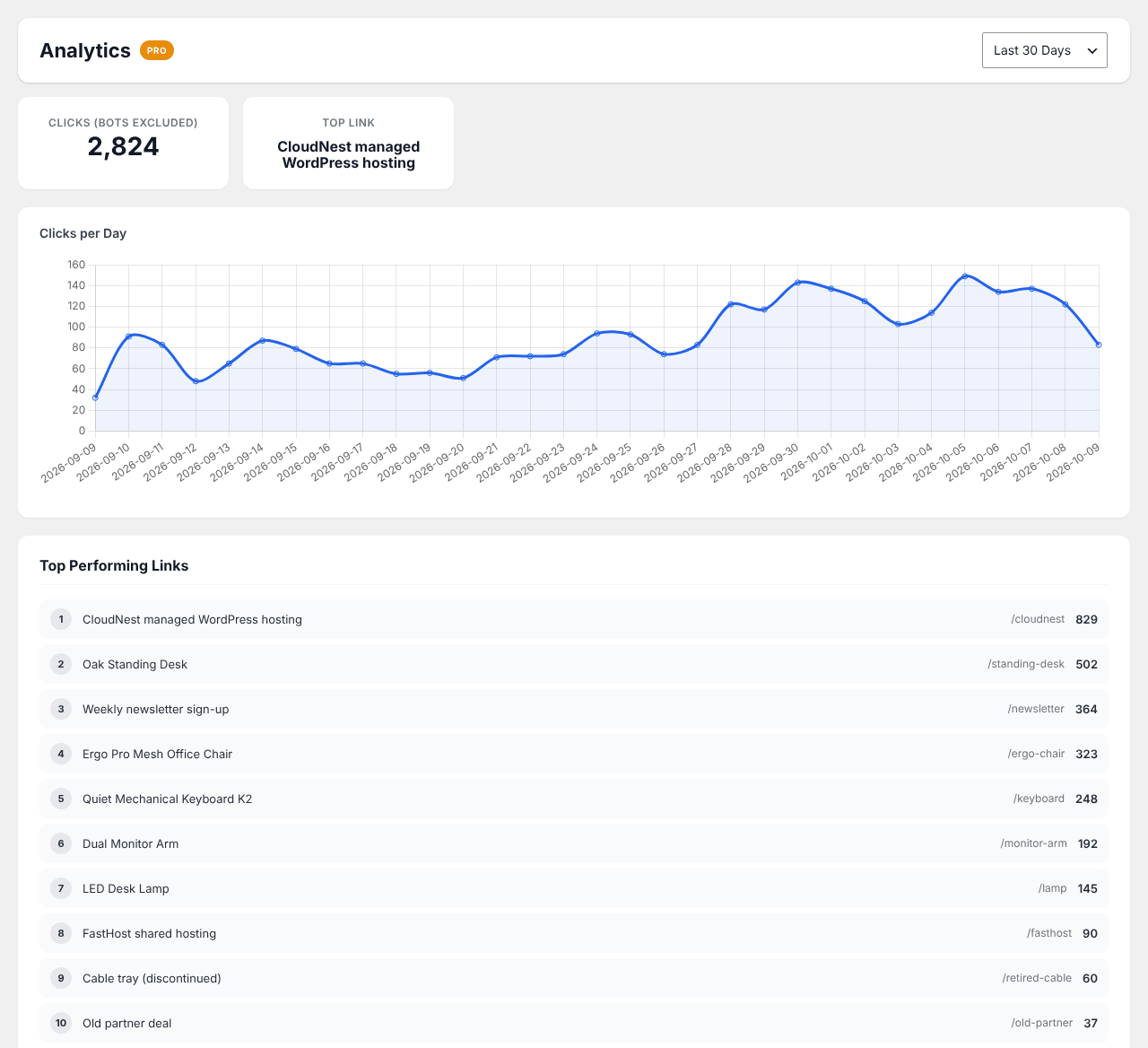
- Click analytics with bot filtering, daily charts and your top links
- A broken-link monitor that emails you and can send visitors to a fallback URL
Put links to work in your content
- Auto-Linker: turn keywords in your posts into links, with per-post limits
- Affiliate disclosure added to posts that contain your links
- A product box block for featuring a product
- QR codes for any link
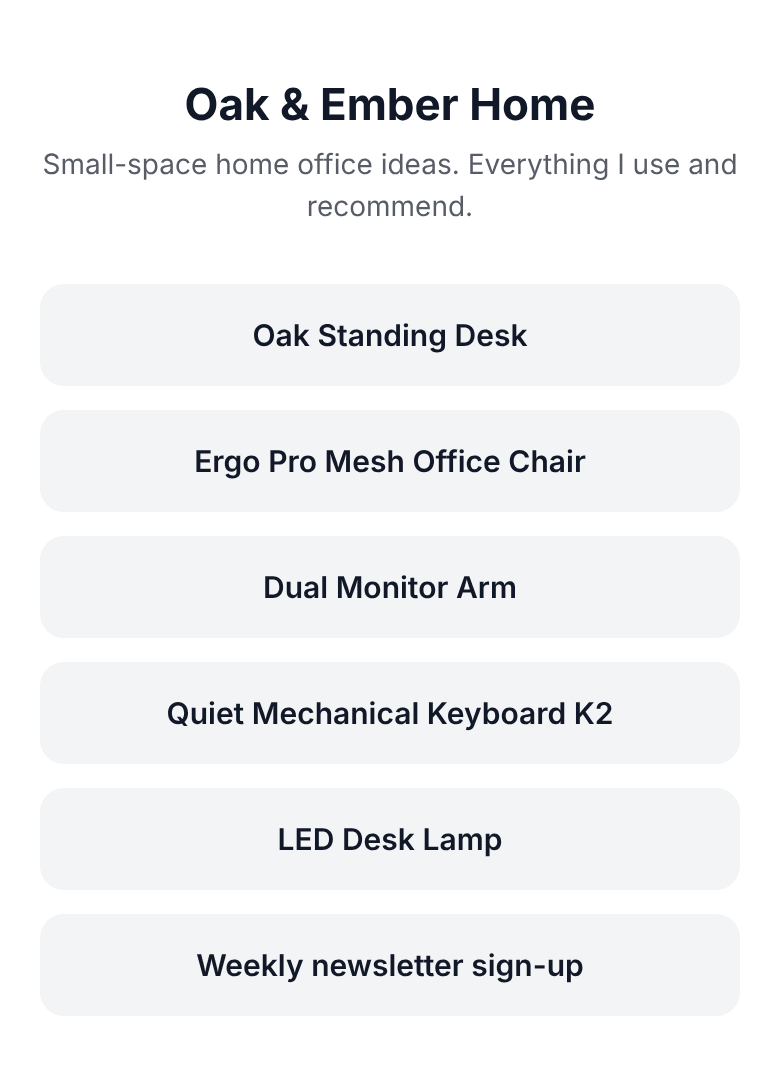
- A Link in Bio page
Move in and build on it
- Import from Pretty Links, ThirstyAffiliates and BetterLinks
- REST API keys for analytics and creating links in bulk
Questions
More answers are in the FAQ and troubleshooting guide. Accounts, licenses and refunds: see the YemLogic FAQ.
Is Yem Links Pro really free?
Yes. Yem Links Pro is included with every free YemLogic account, on up to 3 live sites, with lifetime access and updates for as long as your account is open. No card is needed. Some future YemLogic plugins may have a paid version, and members hear about new plugins first. Create a free account
How do I get Yem Links Pro?
Create a free account, confirm your email, and download Yem Links Pro from My Plugins in your member dashboard. Install it after the free Yem Links plugin, then paste your license key under Yem Links → Settings → Pro License and click Activate. Install Yem Links Pro
Do I need the free Yem Links plugin too?
Yes. Pro is an add-on to Yem Links, so keep both installed and active. Everything in the free plugin keeps working as it is, and Pro adds its options on top. If Yem Links is deactivated, Pro loads nothing until you activate it again; your Pro settings are kept.
Where do I find my license key?
In your member dashboard, on the Overview and License & Sites tabs, after you confirm your email address. One key covers every YemLogic plugin on your account.
What do you do with my email address?
We use it for your account: confirming your address, password resets and license notices. Product news is sent only if you tick the box when you sign up, and you can unsubscribe any time.
How does geo targeting work?
Add country rules to a link to send visitors from each country to a different URL, with an Everyone else rule for the rest. Yem Links reads the visitor’s country from your host or CDN, for example Cloudflare with IP Geolocation on. Without that, country rules never match, but device rules still work. Geo and device targeting
Can I split test two affiliate offers?
Yes. Add two or more destinations to a link and give each a weight from 1 to 100; each click picks one in proportion. Yem Links doesn’t report clicks per variant, so measure results at the destinations, for example in your affiliate network’s reports or with a different tracking parameter in each URL.
What does the Auto-Linker do?
It turns keywords you choose into short links in your posts when a page is displayed. Your posts aren’t changed in the database, so turning it off removes the links again. You set how many links a post may get, from 1 to 20 (3 by default), and headings are skipped unless you allow them.
What does Pro’s click analytics record?
Each counted click with its date and time, the referring page, the country when your host or CDN reports it, the device type, operating system and browser, and a shortened IP address that doesn’t identify one device. Bots are always left out, and logs are kept for 90 days unless you change it.
Can I make a link expire?
Yes. Set an expiry date, a maximum number of clicks, or both. After that, visitors go to your home page, or to the Expired Link Fallback URL you set once in Settings. Visits to an expired link aren’t counted.
What is Ghost Mode?
Ghost Mode cleans up a redirect. It removes analytics and ad-click parameters, such as utm_source, fbclid and gclid, from the link’s main destination, and tells the destination nothing about the page the visitor came from. Affiliate and partner IDs are kept, so the merchant still credits you. Targeting and split-test URLs, and parameters forwarded from the visitor’s short link, pass through unchanged.
Can I import links from Pretty Links, ThirstyAffiliates or BetterLinks?
Yes. The importer in Yem Links → Tools reads their links straight from the database, even if the other plugin is deactivated, and skips slugs that already exist, so running it again is safe. If the old plugin used a prefix, set Base Slug / Prefix to the same one before you deactivate it, so links already in your posts keep working.
What happens if Pro can’t reach the license server?
Pro keeps working for up to 48 hours and tries again at the next check, twice a day. Your links always keep redirecting to their main destinations; only the Pro features pause if the license stays inactive.
Get Yem Links Pro free
Create an account in under a minute, confirm your email, and your download and license key are in your member dashboard.