Yem Links
Short links on your own domain, with click counts that leave out bots and a health check for every destination. Free, fast, and no account needed.
Needs WordPress 6.0 or newer and PHP 7.4 or newer. Licensed under the GPL.
Link health, checked today
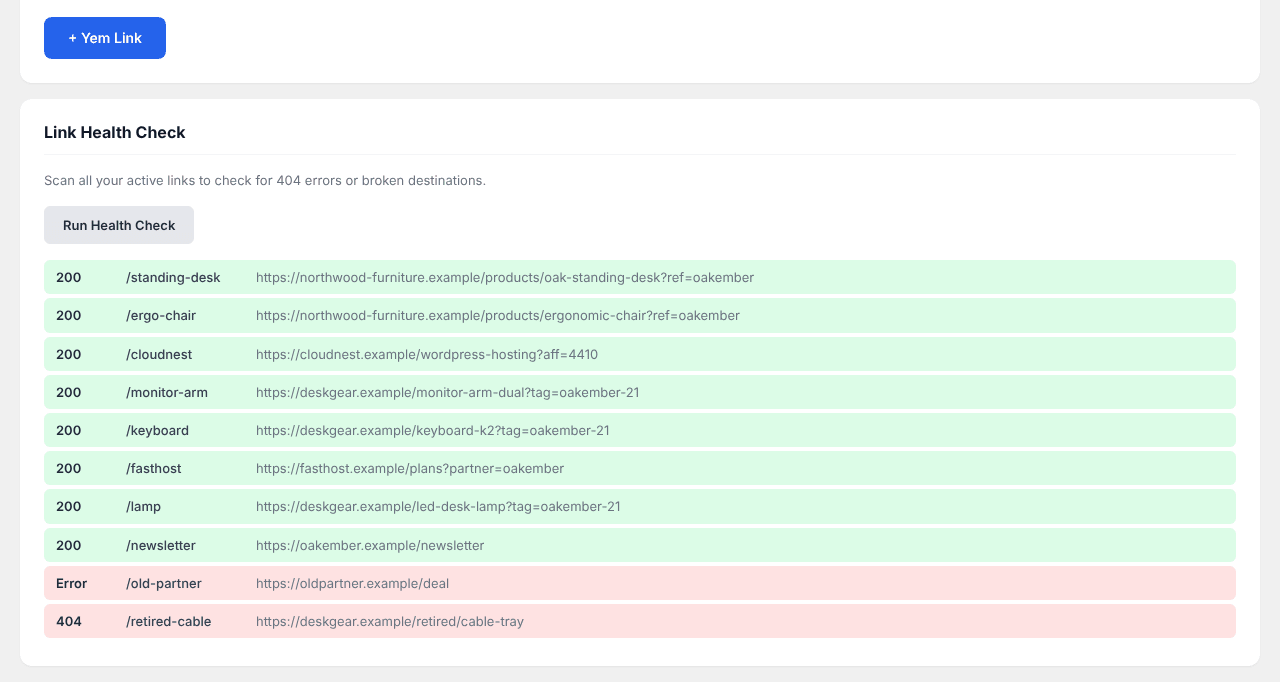
go/standing-desk200 OKgo/mic-arm200 OKgo/ring-light200 OKgo/old-webcam404 Not Found
One destination needs a new URL before readers hit it
See it in action
Numbers you can act on
Click counts leave out bots
Googlebot, Bingbot, AhrefsBot, SemrushBot, GPTBot and other crawlers follow your links constantly. Most link plugins count every one of those visits as a click, so the numbers you use to judge a placement are inflated by traffic that was never going to buy.
Yem Links checks each visit against a list of known crawlers before the counter goes up. Prefer raw hits? Turn bot filtering off in Settings.
Broken destinations show up first
Merchants retire products and change URLs without warning. The health check requests each destination and reports the status code it answered, so you find the dead link instead of your readers.
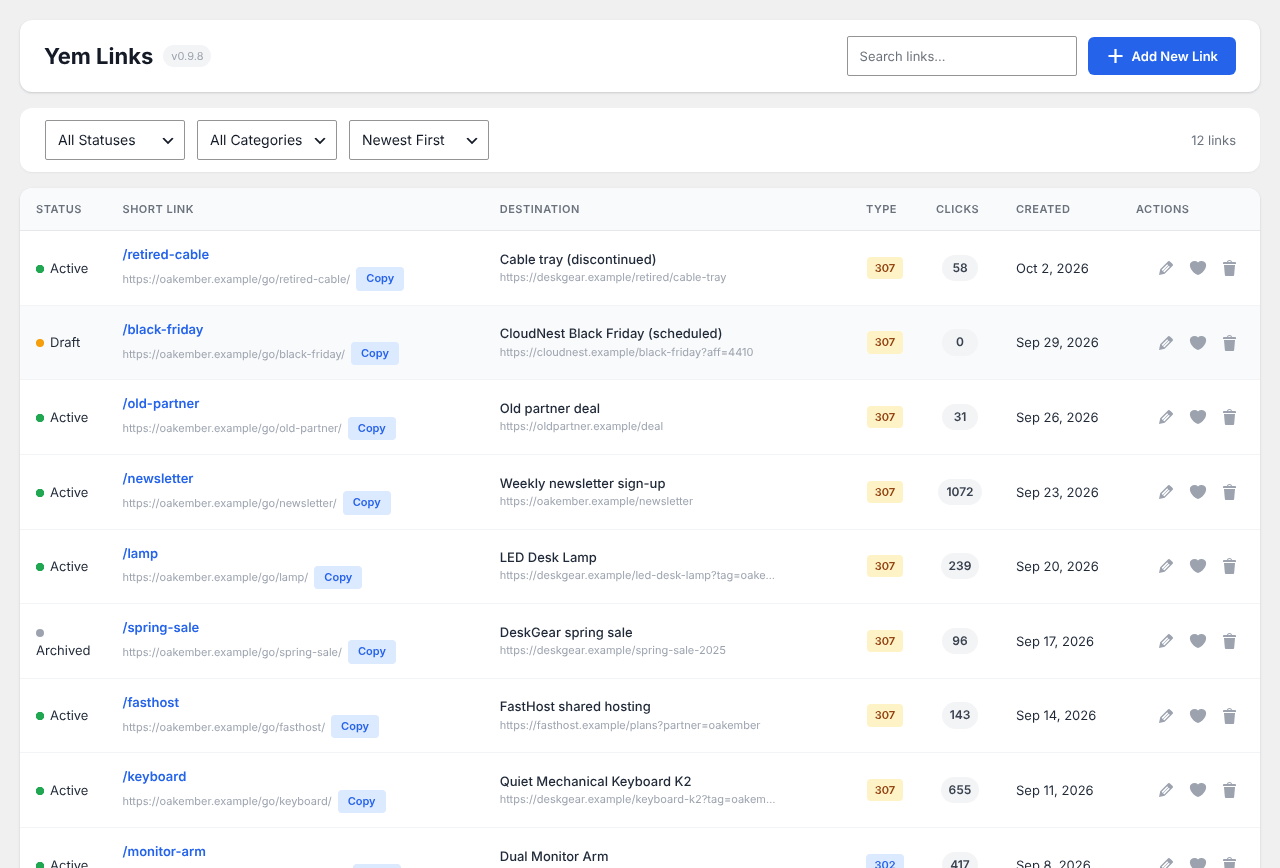
Check a single link from its row in the list, or every active link at once from the Tools screen.
Built for speed
A redirect should cost your server almost nothing. Yem Links is built so it does.
Its own database table
Links live in a dedicated table indexed on the slug, not mixed in with your posts and options.
Redirects before the page is built
The redirect runs as soon as plugins have loaded: before your theme, and before WordPress builds the page.
Cached lookups
With a persistent object cache such as Redis or Memcached, the link lookup comes from memory instead of the database.
Everything in the free plugin
No account, no license key, and no features held back behind an upgrade.
- 301, 302 and 307 redirects
- A prefix you choose: /go/, /out/, /recommends/ or anything else
- Custom slugs, categories and tags
- Titles filled in automatically when you paste a URL
- One-click copy for every short link
- Bot-filtered click counts
- Health checks for one link or all of them
- Nofollow and sponsored attributes
- A block for inserting links while you write
- A bookmarklet for creating links from any web page
- A REST API for managing links from your own code
- A dashboard with live search, filters and a slide-over editor
Free, and free with an account
The free plugin is complete on its own. Pro adds tools for people who run many links, and it costs nothing with a YemLogic account.
Yem Links
Free download. No account, no license key.
- Short links on your domain with 301, 302 or 307 redirects
- Your own prefix: /go/, /out/, /recommends/ or anything else
- Click counts that leave out known bots
- Health checks for one link or all of them
- Nofollow and sponsored attributes for each link
- Categories, tags, a block for the editor, a bookmarklet and a REST API
Yem Links Pro
Free with a YemLogic account. Everything in Yem Links, plus:
- Geo and device targeting
- A/B split tests with weighted variants
- Click analytics with daily charts and top links
- Link expiry by date or click count
- Auto-linking of keywords in your posts
- Broken-link alerts with a fallback URL
- QR codes, a Link in Bio page and a product box block
- Import from Pretty Links, ThirstyAffiliates and BetterLinks
Questions
More answers are in the FAQ and troubleshooting guide. Accounts, licenses and refunds: see the YemLogic FAQ.
What is Yem Links?
Yem Links is a free WordPress plugin for short links on your own domain, such as example.com/go/name. It handles 301, 302 and 307 redirects, counts clicks with bots left out, and checks that each destination still works. It’s free on WordPress.org, with no account and no features held back.
How do I create short links on my own domain in WordPress?
Install Yem Links from Plugins → Add New Plugin by searching for “Yem Links”, or upload the zip from its WordPress.org page, and activate it. Go to Yem Links → All Links, click Add New Link, enter a slug and the destination URL, and save. Your short link is your domain, the prefix and the slug, for example example.com/go/shoes. Create and manage links
Should I use a 301, 302 or 307 redirect?
Use 307, the default, for affiliate links and anything you may point elsewhere later; choose 302 only if a partner or ad platform asks for it. Use 301 only when a short link permanently replaces an old URL, because search engines then treat the destination as the page to remember. Yem Links sends no-cache headers, so a changed destination takes effect straight away with any type. A 307 also keeps the request method unchanged.
Do short links or redirects hurt my SEO?
Short links themselves aren’t indexed: every redirect sends an X-Robots-Tag: noindex header. For affiliate links, Google asks for rel=”sponsored”, and nofollow is also accepted. Yem Links adds them to links you insert with the Yem Link block, from each link’s Nofollow and Sponsored boxes; new links start with nofollow on and sponsored off, and you can change the defaults in Settings. Add them yourself to short links you paste by hand.
Does it work with affiliate links?
Yes. Tick Nofollow and Sponsored per link, or by default for new links in Settings, and links you insert with the Yem Link block carry them. Short links you paste by hand need rel=”sponsored” added in the editor. Some programs, Amazon Associates among them, have rules about shortening or cloaking their links, so check your program’s terms before you shorten its links.
Will it slow down my site?
No. Redirects run as soon as plugins have loaded, before your theme and before WordPress builds the page. The lookup is a single indexed query, and sites with a persistent object cache serve it from memory.
How does Yem Links count clicks without Google Analytics?
It counts each visit to an active short link on your server, as the redirect happens, so it needs no tracking script or cookie on your pages. Each visit is checked against a list of known crawlers first, so known search engine, SEO, AI and link-preview bots aren’t counted. Click counts and bot filtering
Why are my click counts lower than my analytics tool shows?
Because Yem Links leaves out known bots. Search engine crawlers, SEO tools and AI scrapers follow links all the time, and counting them inflates the number. You can turn bot filtering off in Settings if you prefer raw hits.
Can Yem Links find broken affiliate links?
Yes. The health check requests each destination and shows the status code it answered, so you find a dead link before your readers do. Check one link from its row, or every active link at once from the Tools screen. Yem Links Pro adds a monitor that emails you and can send visitors to a fallback URL.
Can I change the /go/ prefix?
Yes. Set any prefix in Yem Links → Settings, such as /out/ or /recommends/. Existing links work under the new prefix straight away, and links inserted with the Yem Link block update automatically. Short links you pasted by hand or shared elsewhere use the old prefix, and those addresses stop working.
Can I create links without opening the Yem Links screen?
Yes. The bookmarklet opens the Add New Link panel from any web page you’re visiting, with its address and title filled in, and the REST API creates and manages links from your own code. The Yem Link block inserts links you’ve already made while you write. Block, bookmarklet and REST API
Is Yem Links really free? What does Pro add?
Yes. Every feature in the free plugin list above works with no account and no license key. Yem Links Pro is free too, with a YemLogic account, and adds geo and device targeting, split tests, click analytics, link expiry, an Auto-Linker, a Link in Bio page and imports from other link plugins.
What happens to my links if I deactivate the plugin?
Nothing is lost. Your links stay in the database and work again when you reactivate. Deleting the plugin only removes your data if you turn that on first under Data Management in Settings.
Does it work if WordPress is in a subfolder?
Yes. Short links work on sites installed in a subfolder such as example.com/blog/.
Get Yem Links Pro free
Create an account in under a minute, confirm your email, and your download and license key are in your member dashboard.