Divi Doctor
Diagnose, fix and extend Divi 5. Find the real cause when a site breaks, choose what Divi’s Safe Mode switches off, stop the header flash, and add what Divi is missing, such as YouTube and Vimeo video backgrounds. Every fix and feature is off until you switch it on, and no Divi files are ever edited.
Every feature for one site, cancel any time. Many sites? Black Friday founder deal: lifetime license for unlimited sites, $129 once (was $179) until November 30, first 100 buyers. 14-day refunds. Watch the 1-minute tour. Needs Divi 5, WordPress 6.4+ and PHP 7.4+.
The fixes Divi users ask for most
YouTube and Vimeo backgrounds, fixes for the page flash and the header flash, and tools that find out why a site broke. Each one has its own switch.
Most requested
YouTube and Vimeo video backgrounds
Divi 5 background videos only take MP4 and WebM files. Paste a YouTube or Vimeo link into any section, row, column or module, and it plays in the builder straight away.
- Sound and pause buttons for your visitors
- Loads after the page, so the page stays fast
- No big video files to upload or host
Divi 5 bug fix
No more flash and jump while pages load
Up to Divi 5.18.2, Divi 5 sets its fonts and global variables at the very end of the page, so text flashes in the wrong font and the layout jumps: a flash of unstyled content (FOUC). One switch moves Divi’s own output to the top of the page. Divi 5.19.0 prints it there itself, so this fix is for Divi 5.18.2 and earlier.
- Pages are drawn right the first time
- Stops the jump PageSpeed reports as layout shift (CLS)
- Switch it off and stock Divi is back
- A second fix stops the header flash on the first view after Divi clears its CSS cache, also on Divi 5.19.0
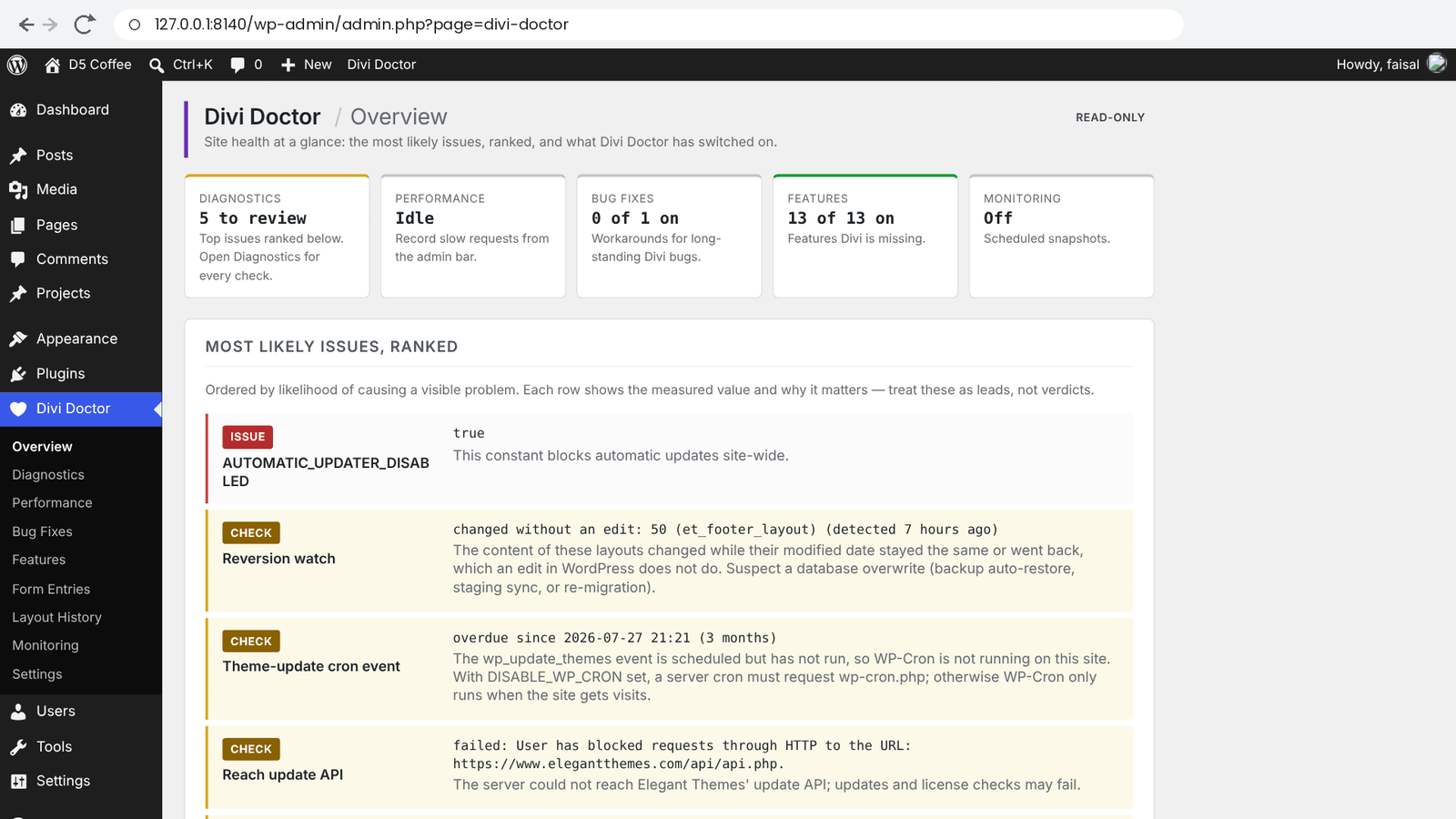
When a site breaks, find the cause · read-only, never changes your site
Site health
Diagnostics
Site Checks reads your WordPress, server and Divi setup. Every result shows the measured value and the reason for its verdict. Exception Watch lists PHP errors that come from Divi, with file and line. Hosting & Resources checks memory, time limits and input limits. With the Safe Mode controls you choose what Divi’s Safe Mode switches off, so you can tell a plugin, the child theme and custom code apart.
Broken CSS
Page Scan
Enter a page ID and Divi Doctor checks the Custom CSS of the page, its modules, your Theme Builder layouts, off-canvas panels and the Customizer’s Additional CSS. It names the broken field and the line.
See it in action
See where the time goes
Read-only tools for slow or flaky Divi sites. They never change your site.
Performance
The Request Profiler records real requests from your own browser only (page views, builder saves, AJAX and REST) and shows where the time went: by plugin, theme and Divi, the slowest hooks and queries, outgoing calls and Divi cache clears. Site Weight measures the database, autoloaded options, revisions and Divi’s CSS cache. How Performance works.
Monitoring
Regular snapshots record whether pages have their CSS, the size of Divi’s shared stylesheet, the cache files and whether a layout changed. When styling disappears after a quiet weekend, you can see which layer changed first. Cron Setup gives you the exact command for your hosting panel. How Monitoring works.
Add what Divi is missing
Features clients ask for and Divi 5 can’t do yet. Each one works inside Divi’s own builder, so presets, responsive values and hover states keep working.
Contact Form
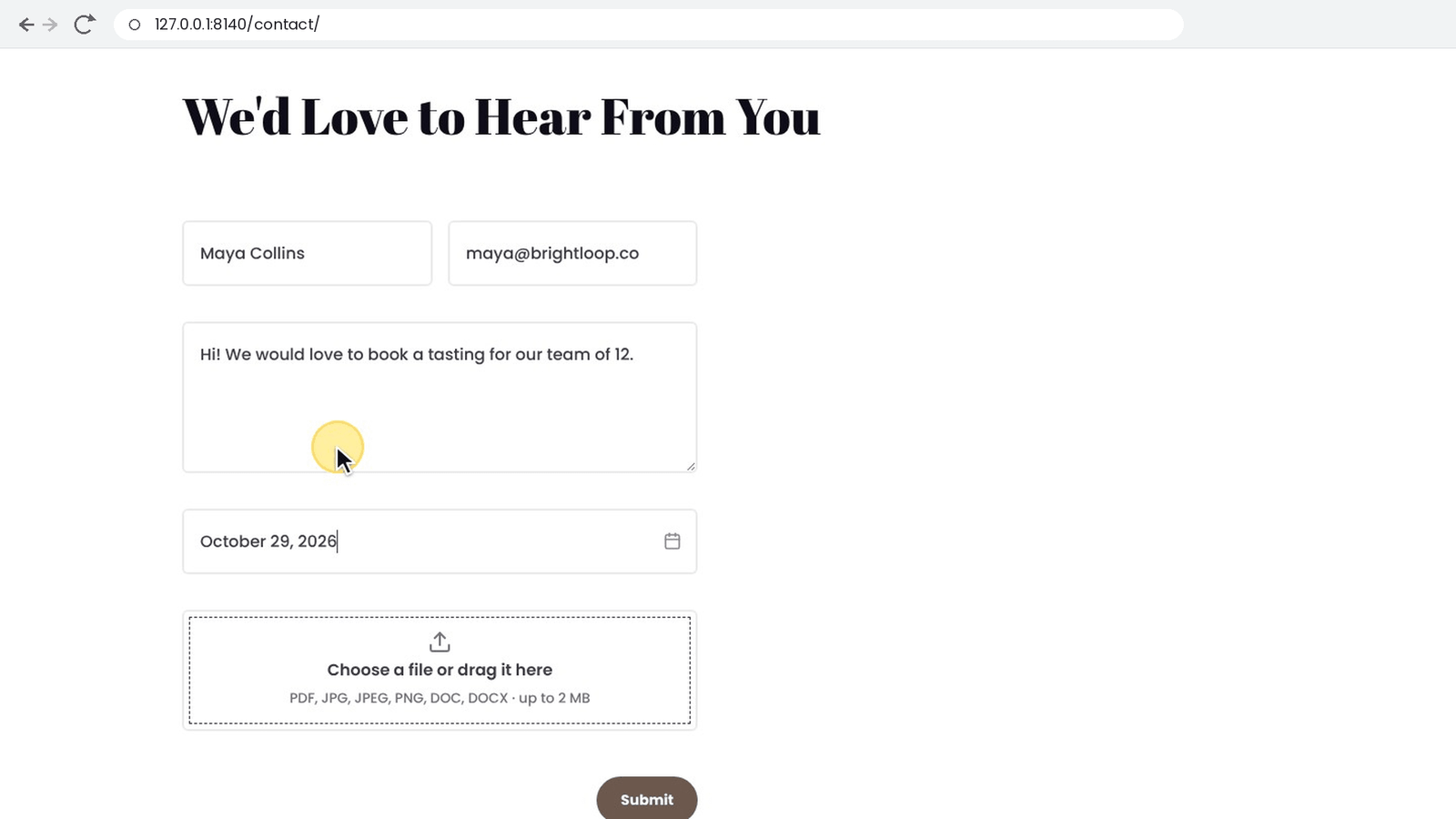
- Date picker and file upload fields
- Every message saved on your site, with search and CSV export
- Your own email subject, HTML email and a thank-you email
- Senders added to a Mailchimp list, with tags and an optional consent checkbox
- Success message design
- Your own error messages, per form and per field, with their own design
- CC, BCC and routing to an address by the visitor’s answer, plus the page it was sent from
- Redirect in a new tab, for the Contact Form and Email Optin
Everywhere else
- YouTube and Vimeo video backgrounds, with sound and pause buttons
- Image captions with full text styling
- Theme Builder and Divi Library history: compare earlier saves and restore one
- Email Optin tags for Mailchimp, ActiveCampaign and AWeber, and Klaviyo as a new email provider
- Portfolio lightbox for Portfolio, Filterable Portfolio and Post Carousel
- Gallery slider captions and Gallery images from a custom field
- Video from a custom field in the Video module and Video Slider
- Blog order: sort by title, modified date and more, and ignore sticky posts
- Number Counter separators: 1,250,000 instead of 1250000
- Nested numbered lists: 1, a, i or 1.1.1 in the Text module
- Accordion and Toggle speed, site-wide, and closing the open Accordion item
Built to stay out of the way
Off until you switch it on
Every fix and feature has its own switch, and each one starts off.
Never edits Divi files
Everything is added through WordPress and Divi hooks. Turn a feature off or deactivate the plugin and stock Divi is back.
Tested on current Divi
Built against Divi 5.15.1 and tested on every Divi 5 release since, up to Divi 5.19.0. Each feature shows a live “How it works” check, so you can see it’s still working after a Divi update.
Pricing
Start at $19 for the first year on one site, then $29 a year. Every plan includes every feature, and you can ask for a refund within 14 days.
Start here
Starter
1 site
$29 $19
first year, then $29 a year
- Every feature
- Updates and support for a year
- Cancel any time
Plus
3 sites
$49
per year, renews yearly
- Every feature
- Updates and support for a year
- Cancel any time
Unlimited
Unlimited sites
$89
per year, renews yearly
- Every feature
- Updates and support for a year
- Made for agencies
Lifetime
Unlimited sites
$179 $129
one payment, no renewals
One payment, every Divi site you build. Was $179, now $129 until 30 Nov.
- Every feature
- Lifetime updates and support
- Pay once, keep it
Black Friday founder deal · until November 30 · first 100 buyers
Many sites? Pay once for unlimited sites
A lifetime license for every site you build or look after, client sites included, with every future update and support.
$129 once until November 30 (founder price $179, regular lifetime $249)
Prices in US dollars; tax is added at checkout where it applies. After you pay, Divi Doctor is ready to download in your YemLogic dashboard. Not the right fit? Ask for a refund within 14 days, see the refund policy.
Questions
More answers are in the FAQ and troubleshooting guide. Accounts, licenses and refunds: see the YemLogic FAQ.
What is Divi Doctor?
Divi Doctor is a WordPress plugin by YemLogic for websites built with Divi 5. It does three jobs. Read-only diagnostics find why a site breaks or slows down. Opt-in bug fixes stop the page flash, layout shift and header flash while pages load. And features Divi users keep asking for, such as YouTube and Vimeo video backgrounds, Contact Form uploads and custom error messages, Klaviyo for the Email Optin and a Portfolio lightbox, work inside Divi’s own builder.
What’s new in Divi Doctor 2.1?
Safe Mode controls. Divi’s Safe Mode switches off every plugin, the child theme and all custom code at once; now you choose what it switches off: the plugins, the child theme, the Custom CSS and the Integration code, and plugin by plugin which plugins stay active, so you can find the one that causes a problem. Like Divi’s Safe Mode, it only applies to you, and visitors keep seeing the normal site. YouTube background videos also stay hidden while YouTube’s player shows its own buttons, and Divi Doctor 2.1 is checked with Divi 5.19.0. Safe Mode controls guide · Changelog
What’s new in Divi Doctor 2.0.0?
Fourteen features Divi users have asked for: custom Contact Form error messages, CC, BCC and routing, redirect in a new tab, Klaviyo for the Email Optin, ActiveCampaign and AWeber tags, a Portfolio lightbox, Gallery slider captions and custom field images, video from a custom field, Blog order and sticky posts, Number Counter separators, nested numbered lists, closing the open Accordion item and Divi Library history. It also adds the header flash fix and the Legacy Modules finder. All stay off until you switch them on. See the changelog for every release.
Does Divi Doctor work with Divi 4?
Divi Doctor is built for Divi 5, version 5.15 or later. Its bug fixes and features use the Divi 5 builder, so with Divi 4 they aren’t supported. Many diagnostics still run on Divi 4, such as the hosting, update and content weight checks, but the Divi 5 checks are skipped.
Is it safe to use on a live site?
Yes. Diagnostics only read and report. Every fix and feature is off until you switch it on, and switching it off, or deactivating Divi Doctor, gives you stock Divi back. The only actions that change Divi data are restoring a Theme Builder or Divi Library revision, and removing saved Klaviyo accounts, and only when you click to do it. If you used the HTML email option, edit those forms’ Message Pattern before you deactivate, or Divi sends it with the HTML tags showing. Try new fixes on a staging copy first if you can.
Will it slow my site down?
It’s built not to. Diagnostics, Page Scan and Site Weight run only when you open their screens, and Exception Watch only notes Divi errors as they happen. The Request Profiler records only your own browser while you record. Monitoring, once on, loads your home page and Divi’s stylesheet every couple of hours. Fixes and features do nothing until you switch them on, and their files load only on pages that use them.
Does it edit Divi’s files?
No. Everything is added through WordPress and Divi hooks. Turn a feature or fix off, or deactivate the plugin, and stock Divi is back.
Why does my Divi 5 page flash unstyled and jump while it loads?
Up to Divi 5.18.2, Divi 5 prints its global CSS variables, such as your heading and body fonts and Global Variables, at the very end of the page. Until the browser gets there, text shows in a fallback font and sizes collapse, then everything jumps into place. PageSpeed reports this as layout shift (CLS). Divi 5.19.0 fixed this in Divi itself. On Divi 5.18.2 and earlier, Divi Doctor’s fix moves Divi’s own output to the top of the page, so the page is drawn right the first time. How the fix works
Can Divi use a YouTube or Vimeo video as a background?
Not on its own: Divi 5 background videos only take MP4 and WebM files. With Divi Doctor, you paste a YouTube or Vimeo link into Background → Video on any section, row, column or module. It plays muted and looped like Divi’s own background videos, loads after the page so the page stays fast, and can have sound and pause buttons. Video backgrounds guide
Can I add file upload and date picker fields to the Divi Contact Form?
Yes. Divi 5’s Contact Form has no file upload or date field. Divi Doctor adds both as new field types in the form’s own settings. You choose the allowed file types, the maximum size and whether visitors can attach several files, and files arrive attached to Divi’s email. Date picker and file upload fields
Can I save Divi Contact Form messages on my site?
Yes. Divi’s Contact Form only emails each message, so a lost email means a lost message. With Save form entries on, Divi Doctor keeps a copy of every message that passes Divi’s checks, with search and CSV export, and records whether Divi’s email went out. Saved form entries
Can the Divi Contact Form send a confirmation email to the visitor?
Yes. Divi Doctor adds a confirmation email to the person who sent the form, plus your own email subject and an HTML email written in a rich-text editor. Each option has its own switch and works only on forms where you set it. Email subject, HTML email and confirmation email
How do I change the Contact Form error messages in Divi 5?
Divi 5 has no setting for them. With Divi Doctor, open the Contact Form in the Visual Builder and write your own texts in its Error Messages group, for each form and each field, then style the error box with Divi’s design options. Contact Form error messages
Can the Divi Email Optin module connect to Klaviyo?
Not in Divi itself. Divi Doctor adds Klaviyo to the Email Optin module’s Service Provider list: add your account with a private API key, pick a list, and visitors who sign up are added to it. Klaviyo for the Email Optin module
Can the Divi Portfolio module open images in a lightbox?
Yes, with Divi Doctor. It opens the featured images of Portfolio, Filterable Portfolio and Post Carousel items in Divi’s own lightbox, with arrows, swipe and the item’s title. Portfolio lightbox
Which Divi 4 modules trigger backward compatibility mode on my page?
Divi Doctor’s Legacy Modules tool lists every Divi 4 module that runs in backward compatibility mode on a page: where it is, why it’s legacy and what to do about it. Legacy Modules
How do I find out why my Divi site broke?
Open Divi Doctor → Overview: it ranks the most likely issues. Site Checks reads your WordPress, server and Divi setup and shows the measured value and the reason for each verdict. Exception Watch lists PHP errors that come from Divi, with file and line. Page Scan names the Custom CSS field and line that broke a page’s styling. All of them are read-only. Then the Safe Mode controls switch the plugins, the child theme or custom code off for you alone, to narrow it down. Step-by-step guide · Diagnostics guide
Why is my Divi site or Visual Builder slow?
Divi Doctor’s Request Profiler records the requests from your own browser, such as page views, builder saves, AJAX and REST calls, and shows where the time went: by plugin, theme and Divi, the slowest hooks and queries, and outgoing calls. Site Weight measures the database, autoloaded options, revisions and Divi’s CSS cache. Request Profiler and Site Weight
What happens after a Divi update?
Each feature card runs live checks for the parts of Divi it relies on, so you can see that it still works. Divi Doctor is built against Divi 5.15.1 and tested on every Divi 5 release since, up to Divi 5.18.2. After a Divi update, open Features and Bug Fixes, look for checks that aren’t OK, and send one test through each feature you use.
How much does Divi Doctor cost?
- Starter: $29 a year, 1 site
- Plus: $49 a year, 3 sites
- Unlimited: $89 a year, unlimited sites
- Lifetime: $249 once, unlimited sites
- Founder deal: $129 once until November 30 (Black Friday; then $179) for a lifetime license on unlimited sites, first 100 buyers
Every plan includes every feature. Prices are in US dollars; tax is added at checkout where it applies.
Can I use it on client sites?
Yes. Starter covers 1 site and Plus covers 3. The Unlimited, Lifetime and founder plans cover every site you build or look after, client sites included.
How do I get Divi Doctor after I buy?
Checkout is handled by Lemon Squeezy. Use the email address you want for your YemLogic account. After you pay, log in to your YemLogic dashboard and download the plugin zip. If you don’t have an account yet, one is created for you and we email you a link to set your password.
How do updates work?
New versions appear in your YemLogic dashboard while your plan is active, and always on a lifetime or founder plan. Download the new zip and upload it under Plugins → Add New Plugin → Upload Plugin. WordPress offers to replace the old version and keeps your settings.
What if it doesn’t work for me?
Ask for a refund within 14 days of your purchase and you get your money back. You don’t need to give a reason. See the refund policy.
What happens to my data if I uninstall?
By default, deleting the plugin keeps your form entries, files, logs and settings. To remove everything, tick Delete all Divi Doctor data when the plugin is deleted under Divi Doctor → Settings and click Save settings first.
Do I need a Mailchimp account?
Only for the Mailchimp options. Divi Doctor uses the Mailchimp account you’ve already added in Divi, and your API key never reaches the browser.
Is Divi Doctor made by Elegant Themes?
No. Divi Doctor is made by YemLogic, an independent plugin studio. Divi is a trademark of Elegant Themes, Inc., and YemLogic is not affiliated with or endorsed by Elegant Themes.