Known bug fixes are workarounds for long-standing Divi bugs. Each one is off until you switch it on, never edits Divi’s files or data, and gives you stock Divi back the moment you switch it off. This page covers how the fixes work and the two fixes included: one for pages that flash unstyled and jump while they load, and one for a header that flashes unstyled on the first view after Divi clears its CSS cache.
How bug fixes work
Go to Divi Doctor → Bug Fixes. The screen is labeled Opt-in · changes site behaviour, because unlike the diagnostics, these change what visitors see. The top of the screen shows the Divi version Divi Doctor detected and whether the Divi 5 engine is present. If Divi 5 isn’t active, a notice says so.
Each fix has a card that explains it:
- Issue: the Divi bug in one line.
- Applies to: where the fix runs.
- Symptom: what you or your visitors see.
- Root cause: why Divi does it.
- What the fix does, How to verify and Limits.
- A Status row that shows what the fix actually did on your site.
A fix records its status during a real page view. So that this doesn’t add work to every page view, the record is only rewritten when the result changes or when it’s more than an hour old. The Status row can therefore show an earlier visit than your latest one.
Fixes don’t edit Divi’s files or the content Divi stores. They rearrange how Divi’s own code runs while a page loads. That’s why switching a fix off, or deactivating Divi Doctor, restores stock Divi immediately.
Switch a fix on or off
- On the fix’s card, click Enable fix. The badge changes from Disabled to Enabled.
- Clear any page cache, so visitors get pages built with the fix.
- Open a page on the site while logged out, or in a private window, then reload Bug Fixes and read the fix’s Status row. The header flash fix only acts on the first view after Divi clears a page’s CSS, so follow its own check steps.
To switch it off, click Disable fix and clear the page cache again. Test fixes on a staging copy first if you can.
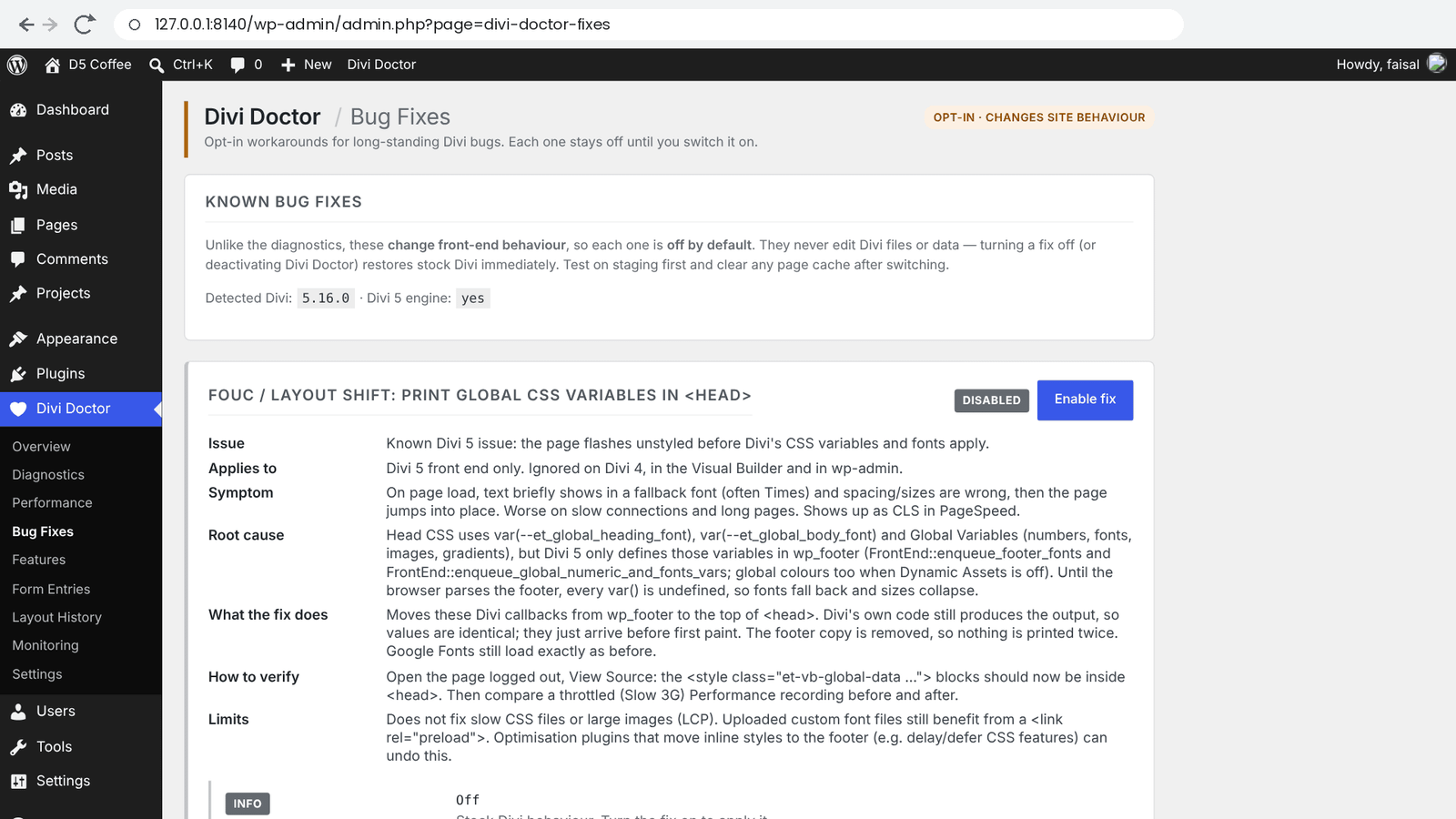
Page flashes unstyled and jumps while it loads
On the Bug Fixes screen this fix is called FOUC / layout shift: print global CSS variables in <head>. FOUC stands for “flash of unstyled content”.
Note: Divi 5.19.0 fixed this in Divi itself. This fix is for Divi 5.18.2 and earlier. On Divi 5.19.0 and later it has nothing to do, its Status row shows On — not needed on this Divi version (Divi Doctor 2.1.1 and later), and you can leave it off. The header flash fix below is still needed on Divi 5.19.0.
The symptom
When a Divi 5 page loads (up to Divi 5.18.2), text briefly shows in a fallback font, often Times, and spacing and sizes are wrong. A moment later Divi’s fonts and sizes apply and the page jumps into place. It’s worse on slow connections and long pages, and PageSpeed reports it as layout shift (CLS).
Why it happens
The CSS at the top of the page uses Divi’s global variables: your heading and body fonts, and Global Variables for numbers, fonts, images and gradients. Up to Divi 5.18.2, Divi 5 defines those variables at the very end of the page, in the footer. Global colors go there too when Dynamic Assets is off. Until the browser reaches the footer, the variables are undefined, so fonts fall back and sizes collapse. Divi 5.19.0 prints them in <head> itself.
What the fix does
It moves the Divi code that prints those variables from the footer to the top of the page’s <head>. Divi’s own code still produces the output, so the values are exactly the same; they just arrive before the page is first drawn. The footer copy is removed, so nothing is printed twice. Google Fonts load exactly as before.
The fix runs on the Divi 5 front end only. It does nothing on Divi 4, in the Visual Builder or in the WordPress admin.
Check that it works
After you switch the fix on and open a page while logged out, the Status row on the card shows one of these:
| Status | What it means |
|---|---|
| Applied … — moved to <head>: … | The fix is working. The list names the Divi functions it moved. Global colors only appear in this list when Dynamic Assets is off. |
| On — waiting for a front-end visit | Nobody has loaded a page since you switched it on. Open any page logged out or in a private window, then reload Bug Fixes. |
| On — not needed on this Divi version | This Divi version prints its global CSS variables in <head> itself, so there’s nothing to move. Divi 5.19.0 and later do. You can switch the fix off. |
| On — nothing to move | Divi’s footer code wasn’t found, and Divi’s own code in <head> wasn’t either. It was renamed, or another plugin removed it. |
| On — but Divi 5 not detected | The fix only acts on Divi 5. On Divi 4 it does nothing. |
| Off | Stock Divi behavior. |
To see it for yourself, open the page logged out and view its source. The <style class="et-vb-global-data …"> blocks should now be inside <head>. Then compare a recording in your browser’s developer tools, throttled to a slow connection, before and after.
Limits
- It doesn’t speed up slow CSS files or large images.
- Custom font files you uploaded still benefit from being preloaded.
- Optimization plugins that move inline styles to the footer, such as delay or defer CSS options, can undo the fix. If the flash comes back, check those settings.
Header flashes on the first view after a cache clear
On the Bug Fixes screen this fix is called Header flash on the first view after a cache clear: move Divi’s late page CSS into <head>. It’s separate from the FOUC fix above: you can switch on either one, or both.
The symptom
For a split second the logo shows at its full image size, the menu shows as plain links or a bulleted list, and section backgrounds are missing. Then the page snaps into place. It only happens on the first view of a page after Divi clears its CSS cache, so it comes and goes:
- Saving a page clears that page’s CSS.
- Saving a Component, a Theme Builder layout or a preset clears all of it.
If a page cache stores that first view, every visitor sees the flash until the cache is refreshed.
Why it happens
Divi writes each page’s CSS to a file in its et-cache folder the first time the page is viewed. On that view the file doesn’t exist yet, so Divi prints the CSS inline at the end of the page instead, after the header and content it styles. The browser draws the page before it reaches those styles. Later views load the CSS file in <head> as usual.
What the fix does
Divi Doctor holds the page’s HTML until it’s complete, the way caching plugins do. Only when Divi printed those late style blocks, it moves them to the end of <head>, in the same order. Divi’s global CSS variable blocks printed before them move along, so the order of Divi’s styles doesn’t change. The CSS itself is unchanged and nothing is printed twice. Pages whose CSS file already exists are left exactly as they are.
The fix runs on the Divi 5 front end only. It does nothing on Divi 4, in the Visual Builder, in the WordPress admin, in feeds, or for anything that isn’t an HTML page.
Check that it works
- Switch the fix on and clear any page cache.
- Save a page in the Visual Builder. That clears its CSS file.
- Open the page while logged out, or in a private window.
- Reload Divi Doctor → Bug Fixes and read the fix’s Status row.
| Status | What it means |
|---|---|
| Applied … on “…” — moved to <head>: … | The fix is working. It says how long ago it acted, on which page, and lists the Divi style blocks it moved, such as et-core-unified-…-cached-inline-styles-2. |
| On — waiting for a first view after a cache clear | The fix hasn’t had anything to move since you switched it on. Follow the steps above. On Divi 4 the row stays like this, because the fix does nothing there. |
| Off | Stock Divi behavior. |
The record updates at most once an hour. If you check a second page within the hour, the row still names the first page and its time, as the row’s own text says. The fix still acts on every first view; only the record waits. Switching the fix off and on again clears the record.
To see it for yourself, open your browser’s developer tools on the Network tab before you open that first view, and look at the page’s response: the et-core-unified-…-cached-inline-styles-2 block is inside <head>, not just before </body>. A recording of the same first view, throttled to a slow connection, no longer shows an unstyled header.
Limits
- Only the first view after a cache clear changes. Later views load the CSS file in
<head>as usual. - With Divi’s Critical CSS on, Divi loads the rest of the page CSS after the page shows, on purpose. If a header still flashes on later views, check that its styles are in the critical CSS, or turn off Critical CSS in Divi → Theme Options → Performance.
- Plugins that delay or move CSS can undo the fix.
- Inline styles that other plugins print in the footer before Divi’s now come after Divi’s.
Questions
Does Divi 5.19.0 fix the page flash (FOUC)?
Yes, for the flash caused by late global CSS variables. Up to Divi 5.18.2, Divi 5 defined its global variables at the very end of the page, so text first showed in a fallback font and the page then jumped into place. Divi 5.19.0 prints them in <head> itself. On Divi 5.19.0 and later this fix has nothing to do, its Status row shows On — not needed on this Divi version, and you can leave it off.
Why does my Divi 5 header flash unstyled after a cache clear?
On the first view after Divi clears a page’s CSS, the CSS file in Divi’s et-cache folder doesn’t exist yet. Divi then prints that CSS inline at the end of the page, after the header it styles, and the browser draws the page before it reaches those styles. The header flash fix moves those late style blocks to the end of <head>. This fix is still needed on Divi 5.19.0.
What does the Divi header flash look like?
For a split second the logo shows at its full image size, the menu shows as plain links or a bulleted list, and section backgrounds are missing. Then the page snaps into place. It only happens on the first view of a page after Divi clears its CSS cache, for example after you save a page, a Theme Builder layout or a preset.
Do Divi Doctor’s bug fixes edit Divi’s files or my content?
No. Fixes don’t edit Divi’s files or the content Divi stores. They rearrange how Divi’s own code runs while a page loads, so switching a fix off, or deactivating Divi Doctor, restores stock Divi immediately.
Are the bug fixes switched on by default?
No. Each fix is off until you click Enable fix on its card under Divi Doctor → Bug Fixes. Clear any page cache afterwards, so visitors get pages built with the fix. Test fixes on a staging copy first if you can.
How do I check that a bug fix is working?
Open a page while logged out, or in a private window, then reload Divi Doctor → Bug Fixes and read the fix’s Status row. A fix records its status during a real page view, and the record is rewritten only when the result changes or is more than an hour old, so it can show an earlier visit than your latest one.
Why does the flash come back after I switched a fix on?
Optimization plugins that delay, defer or move CSS can undo a fix, so check those settings first. A page cache can also keep serving a page that was stored before the fix was on: clear the page cache after you switch a fix on or off.
Can I switch on both fixes at the same time?
Yes. The two fixes are separate: you can switch on either one, or both. Neither prints anything twice.
Do the bug fixes work on Divi 4?
No. Both fixes run on the Divi 5 front end only. They do nothing on Divi 4, in the Visual Builder or in the WordPress admin.
Are the bug fixes in the free plugin?
Yes. Both fixes are in Doctor for Divi, the free plugin, and in Divi Doctor Pro. See Doctor for Divi (free) and Divi Doctor Pro.