When a Divi site misbehaves, the cause is often in the server, the database or Divi’s CSS cache, not in the page itself. This page explains what the Site Checks, Exception Watch and Hosting & Resources tabs report, and what to do about each result.
Open Diagnostics
Go to Divi Doctor → Diagnostics. The section has five tabs: Site Checks, Page Scan, Legacy Modules, Exception Watch and Hosting & Resources. Page Scan and Legacy Modules have their own guides: Page Scan and Legacy Modules.
Diagnostics is read-only. Every row shows a verdict (Issue, Check, OK or Info), the value Divi Doctor measured and the reason for the verdict. Some rows add a Suggested action. The most serious results also appear on the Overview under Most likely issues, ranked.
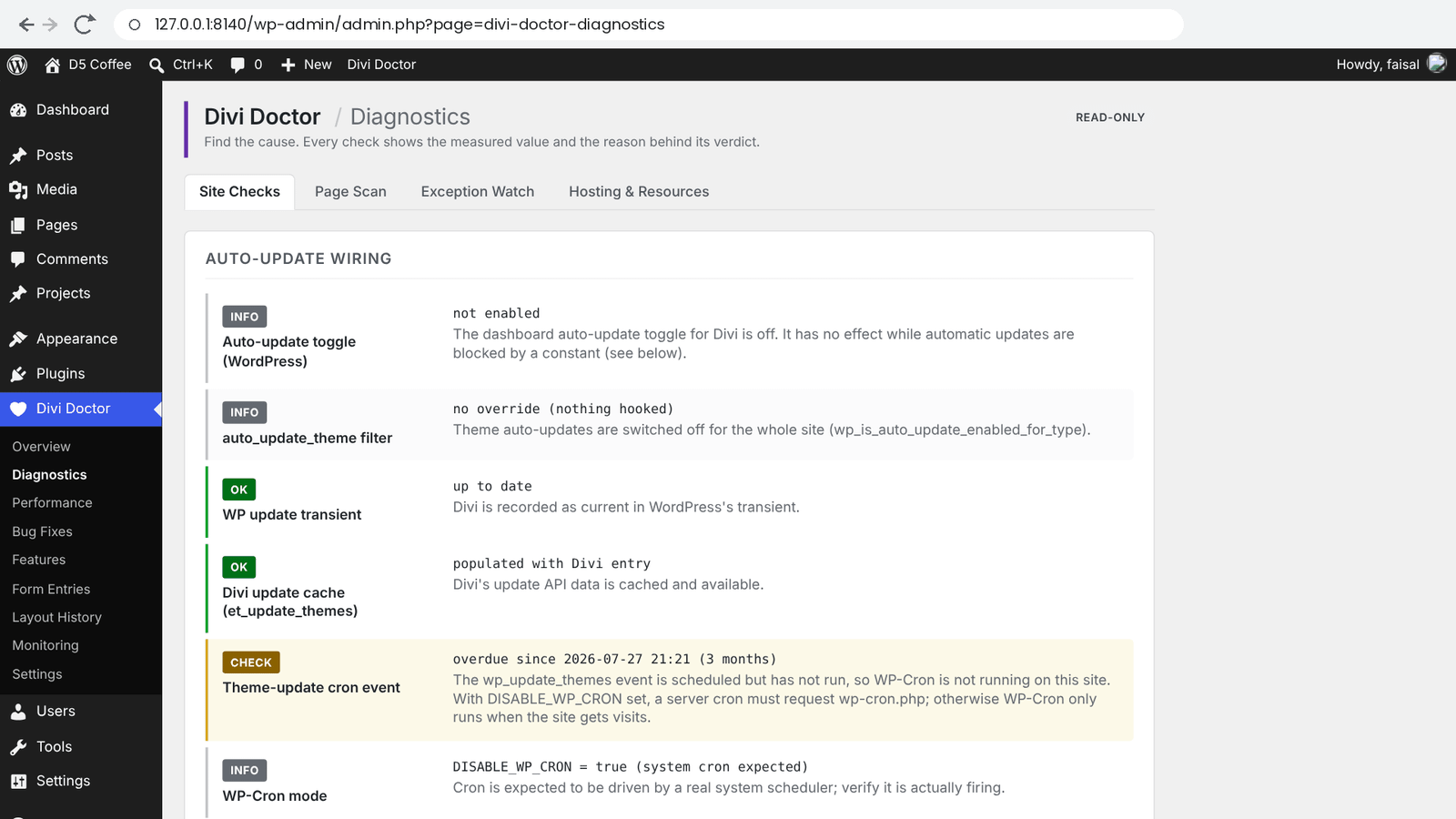
Site Checks
The Site Checks tab groups its checks into five sections.
Auto-update wiring
These checks follow the path WordPress takes to update Divi automatically, so you can see where it stops.
| Check | What it tells you |
|---|---|
| Auto-update toggle (WordPress) | Whether automatic updates are switched on for Divi. If not, turn them on under Appearance → Themes. |
| auto_update_theme filter | Whether code on your site overrides that toggle. Issue means auto-updates are on but a plugin or snippet turns them off for Divi; the value names the code responsible. |
| WP update transient | Whether WordPress’s list of theme updates includes Divi. Check with Divi absent from transient means WordPress won’t even consider Divi when an update run starts. |
| Divi update cache (et_update_themes) | Whether Divi’s own update information is cached and includes Divi. |
| Theme-update cron event | Whether WordPress’s scheduled theme-update check exists and runs on time. overdue since … means WP-Cron isn’t running on this site. |
| WP-Cron mode | Whether WP-Cron runs on visits (the default) or is switched off with DISABLE_WP_CRON, in which case a real server cron must run it. |
| AUTOMATIC_UPDATER_DISABLED, DISALLOW_FILE_MODS | Shown as Issue only when one of these constants is set in wp-config.php. Either one blocks automatic updates for the whole site. |
If WP-Cron isn’t running, see Cron Setup for how to add a server cron job.
Theme Builder & Off-Canvas
This section needs the Divi 5 engine; on other setups it shows skipped.
- Layout: et_header_layout, et_body_layout and et_footer_layout: how many header, body and footer layouts exist and when one was last changed. If that date is a day nobody edited a layout, something else changed it.
- Off-canvas panels: how many off-canvas panels exist. An unexpectedly high count can mean leftover copies from a bad restore.
- Global off-canvas: how many global off-canvas panels exist, and which ones Divi adds above or below the main content of every page. This is normal Divi behavior; it’s listed so you know where a panel on the page comes from.
- Reversion watch: whether a layout’s content changed without anyone editing it. See below.
Reversion watch
Each time you open the Overview or Diagnostics, Divi Doctor stores a fingerprint of every Theme Builder layout and off-canvas panel and compares it with the previous one.
- The first time, it shows baseline captured. Come back over the next days to compare.
- A layout you edited in the builder gets a newer modified date, so it’s listed as edited since last snapshot and marked OK.
- A layout whose content changed while its modified date stayed the same, or went back, shows changed without an edit with its ID and type, marked Check. An edit in WordPress doesn’t do that, so suspect something that rewrites the database directly: a backup that restored itself, a staging sync or a migration. The result stays on screen for a day.
If a layout changed without an edit, compare it with a backup or a staging copy, and check your backup and staging tools for scheduled restores or syncs. With Layout history (revisions) switched on in Features, you can also restore an earlier version of a Theme Builder layout from Divi Doctor → Layout History → Theme Builder. See Theme Builder and Divi Library history.
Layout revisions
Counts the revisions stored for your Theme Builder layouts and off-canvas panels. More than 50 is marked Check: a builder tab left open for a long time can autosave an old version over newer content, and many revisions make that harder to untangle.
Static-CSS pipeline
Divi 5 always serves its page CSS as files from its cache folder on normal page views, so that folder matters. If Divi can’t write there, pages can load with missing styles.
- et-cache directory: the folder’s path, and whether it exists. It’s created on the first page view; if it never appears, writes are failing.
- et-cache writable: Issue when Divi can’t write to the folder. The suggested action is to make
wp-content/et-cachewritable by the web server (folders 755, files 644, owned by the PHP user), then clear Divi’s static CSS. Your host can do this for you. - Static CSS files: how many CSS files are in the folder and how old the newest is. none found means pages will rebuild their CSS on the next visit; on quiet sites that can leave pages unstyled until then.
- Static CSS mode: on Divi 5 this always says always on for the front end (Divi 5). Divi’s Output Styles Inline option doesn’t switch it off on normal page views.
Content weight & inline base64
These checks find the content that most often causes Your Save Has Failed in the builder. They work on Divi 4 and Divi 5 content.
- Inline base64: pages, posts or layouts with images pasted straight into a text editor. Those images are stored as text inside the post, and every save loads every revision of that post in full, so they can exhaust PHP’s memory. Each row names the post and where the image sits, for example
Section 2 › Row 1 › Column 1 › divi/text. 256 KB or more of pasted data is an Issue, 32 KB or more a Check; smaller items such as icons are listed as Info. The fix: back up, delete that post’s old revisions, then replace each pasted image with a Media Library image. - Revision weight: the five posts whose revisions take the most space, compared with the memory a builder save gets. 50% or more of the memory limit is an Issue, 10% or more a Check. The fix: back up, delete that post’s old revisions, and consider limiting revisions with
define( 'WP_POST_REVISIONS', 10 );inwp-config.php.
These checks read every post, so their results are kept for 15 minutes. The line under the section says how long ago they ran. Click Check again to run them now.
Interim fixes (copy-paste)
The bottom of the tab has a short code snippet, Force Divi to re-check for updates during cron, for sites where automatic Divi updates stopped working. It’s a stop-gap for a known issue, not a permanent fix. Add it the way you add other PHP snippets to your site, and test it on one site first.
Exception Watch
Exception Watch keeps a log of PHP errors that come from Divi, without the noise from the rest of the site. It runs on every page load from the moment Divi Doctor is active, so the log fills as people use the site. Open Divi Doctor → Diagnostics → Exception Watch.
Self-tests
Self-tests (Divi functions that often fail) runs three quick tests each time you open the tab: Cache dir accessor, Dynamic content filter and Update transient assembly. A test that throws an error is marked Issue with the error message.
Captured Divi errors
The table lists the 100 newest errors with When, Level (for example FATAL, WARNING, NOTICE or DEPRECATED), Message and File:Line.
- An error is logged when its file is in the Divi theme, your child theme, Divi’s
et-cachefolder or the Divi Builder plugin. Child theme code is included because it’s a common cause of Divi problems. - Only errors your site’s PHP settings report are logged; errors that code deliberately silences are skipped.
- The same error is logged at most once every 10 minutes, so a warning on every page view doesn’t flood the log.
- The log keeps about the 500 most recent errors. Click Clear log to empty it, for example before you test a fix.
- Exception Watch only observes. WordPress and PHP still handle every error exactly as before.
A FATAL row is the most important: that request stopped there. Use the file and line to see whether the error comes from Divi or your child theme, and send the row to whoever supports that code.
Hosting & Resources
Divi Doctor → Diagnostics → Hosting & Resources compares your server’s settings with what the Divi builder needs.
| Check | What it tells you |
|---|---|
| PHP memory_limit | The memory builder saves get, plus the higher value admin screens get and the php.ini value. Below 128M is a Check: the builder can run out of memory, which shows up as failed saves or a blank builder. The suggested action is to raise memory_limit, or set WP_MEMORY_LIMIT to 256M in wp-config.php. |
| WP_MEMORY_LIMIT | Shown when it’s set in wp-config.php. |
| max_execution_time | Under 30 seconds is a Check: short limits can stop layout saves and updates halfway. |
| post_max_size, max_input_vars | For information. They limit layout imports and very large builder saves. |
| Disk free | Less than 200 MB is a Check: Divi may not be able to write its CSS files, and backups may fail. |
| Object cache drop-in, Page cache drop-in | Whether a persistent object cache or full-page cache is installed. If layouts look out of date, clear these caches after Divi edits. |
| PHP ext: gd, mbstring, zip, curl | A missing extension is a Check: image processing, text handling, layout import and export, or update checks may fail. |
| Reach update API | Whether your server can reach Elegant Themes’ update server. A failure means Divi updates and license checks may fail; a firewall or proxy is the usual cause. A good result is kept for 12 hours and a failure for 30 minutes, and the value says when it was checked. |
Most of these settings can only be changed by your host. Send them the row’s value and reason.
What to do next
- A page lost its styling but the checks look fine? Run a Page Scan.
- A page is slow or a module needs a reload to edit? Check it for Divi 4 modules with Legacy Modules.
- Saves or pages are slow? Use the Request Profiler.
- The site broke after an update? Follow Divi site broke after an update, which puts these checks and Safe Mode in order.
- The problem comes and goes? Turn on Monitoring.
Questions
Does running Diagnostics change anything on my site?
No. Diagnostics is read-only. Every row shows a verdict (Issue, Check, OK or Info), the value Divi Doctor measured and the reason for the verdict, and some rows add a suggested action.
Why is Divi not updating automatically?
Go to Divi Doctor → Diagnostics → Site Checks and read the Auto-update wiring section. It follows the path WordPress takes to update Divi: whether automatic updates are on for Divi, whether code on the site overrides that, whether WordPress’s and Divi’s update lists include Divi, whether the scheduled theme-update check runs on time, and whether AUTOMATIC_UPDATER_DISABLED or DISALLOW_FILE_MODS is set in wp-config.php.
Why do my Divi 5 pages load with missing styles?
Divi 5 always serves its page CSS as files from its cache folder, wp-content/et-cache. If Divi can’t write there, pages can load with missing styles. The Static-CSS pipeline checks show whether the folder exists and is writable. If it isn’t, make it writable by the web server (folders 755, files 644, owned by the PHP user), then clear Divi’s static CSS; your host can do this for you.
How do I find out whether a Theme Builder layout changed without anyone editing it?
The Reversion watch stores a fingerprint of every Theme Builder layout and off-canvas panel each time you open the Overview or Diagnostics, and compares it with the previous one. A layout whose content changed while its modified date stayed the same shows changed without an edit. Then suspect something that rewrites the database directly: a backup that restored itself, a staging sync or a migration.
What does “overdue since” mean on the theme-update cron check?
It means WP-Cron isn’t running on this site, so WordPress’s scheduled theme-update check doesn’t run on time. If WP-Cron is switched off with DISABLE_WP_CRON, a real server cron job must run it.
What causes “Your Save Has Failed” in the Divi builder?
Often it is the weight of the content. The Content weight & inline base64 checks find pages, posts or layouts with images pasted straight into a text editor: those images are stored as text inside the post. These checks work on Divi 4 and Divi 5 content.
Which Diagnostics checks need Divi 5?
The Theme Builder & Off-Canvas section needs the Divi 5 engine; on other setups it shows skipped. The content weight checks work on Divi 4 and Divi 5 content.
Is Diagnostics in the free plugin?
Yes. Site Checks, Page Scan, Legacy Modules, Exception Watch and Hosting & Resources are in Doctor for Divi, the free plugin, and in Divi Doctor Pro.